Lightning Manager® and lightning data are optional purchases.
After creating your locations, you can setup one, or all, to be monitored
via the PrecipTimer
|
|
To view the status of your monitored locations, click the Monitored Locations button. The button will flash red when your monitoring criteria has been met.

You can also view the graphical display of the monitors on the Dashboard.
Within the Settings Menu button click the Location Monitoring
Menu option and select the PrecipTimer
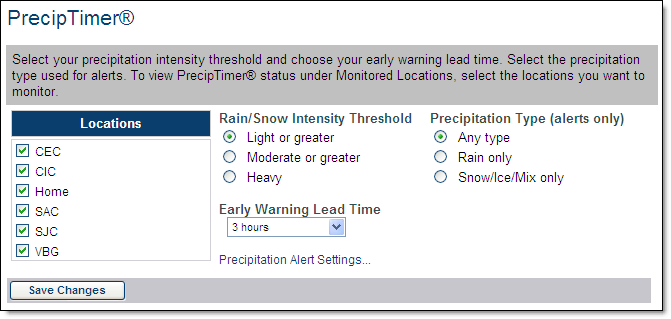
Select one or more locations to monitor.
Each location with a check mark will be monitored and listed under
the Monitored Locations button. All will use the same settings.
Select the Rainfall Intensity Threshold.
This threshold determines what criteria must be met before sending
a notification to the monitored locations page. Select the Light or greater
option to be notified of all approaching precipitation.
Select the Early Warning Lead Time from the drop down
menu. Choose from 30 minutes to three hours.
The lead time determines how many hours in advance you will begin to
receive notification of approaching precipitation.
Click Save Changes to store your settings.
The criteria set here will be used for PrecipTimer
The radar and future radar layers of the Radar/Layered Map display can also assist when monitoring precipitation.
Lightning Manager
After creating your locations, those which are located in your purchased
lightning region may be set up for monitoring via Lightning Manager
To view the monitored locations, click the Monitored Locations button. The button will flash red when your monitoring criteria has been met.
Setup Lightning Manager
Within the Settings Menu button click the Location Monitoring
Menu option and select the Lightning Manager
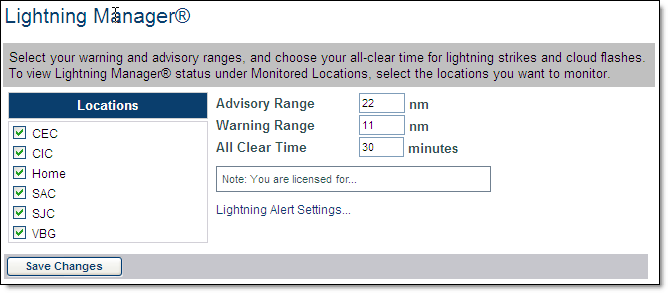
Select the Location(s) to monitor.
All of your locations are listed and can be selected, however only those
located within your lightning coverage area will be active.
Each location with a check mark will be listed under the Monitored
Locations button. All will use the same settings. Within Radar/Layered
Map you may choose to show range rings around only your monitored locations.
Set the range for the warning area (3 to 60 miles).
The warning range is typically set as a smaller radius than the advisory
range. The default range is 8 miles. Do not set your range for a greater
area than your lightning coverage area as only lightning data within your
purchased coverage area will be displayed.
Note: The NWS recommends that people be in a safe location when
lightning is within six miles.
Set the range for the advisory area (3 to 60 miles). The default range is 30 miles. Do not set your range for a greater area than your lightning coverage area as only lightning data within your purchased coverage area will be displayed.
Set the All Clear Time, between 10 and 30 minutes. When no lightning is detected in your advisory range for the set amount of time, you will receive an advisory area all clear alert. Likewise when no lightning is detected in your warning range for the set amount of time you will receive a warning area all clear alert. The default is 15 minutes.
Click Save Changes to store your settings.
The criteria set here
will be used for Lightning Manager
To view an animation of the lightning strikes, load a lightning layer in the Radar/Layered Map page and select the Play icon.
DISCLAIMER: Experience has proven that the timeliness, resolution and manner in which lightning data is displayed does not solely support the effective or reliable use of the data in making decisions of an immediate or short term nature that involve the safety of personnel or material. Any such applications or similar uses by customers are done at the risk of the user and are neither condoned nor recommended by Schneider Electric, Vaisala or Vaisala's suppliers.